Unable to Start Windows Services During TCMSv3/Ingress Installation

Introduction
The error message below appears because your Windows account login does not have sufficient privileges, or you are not logged in as an Administrator. The Administrator account you are having also must be able to access any folders and have privileges to start services for FingerTec Software to be successfully installed.

Introduction
The error message below appears because your Windows account login does not have sufficient privileges, or you are not logged in as an Administrator. The Administrator account you are having also must be able to access any folders and have privileges to start services for FingerTec Software to be successfully installed.
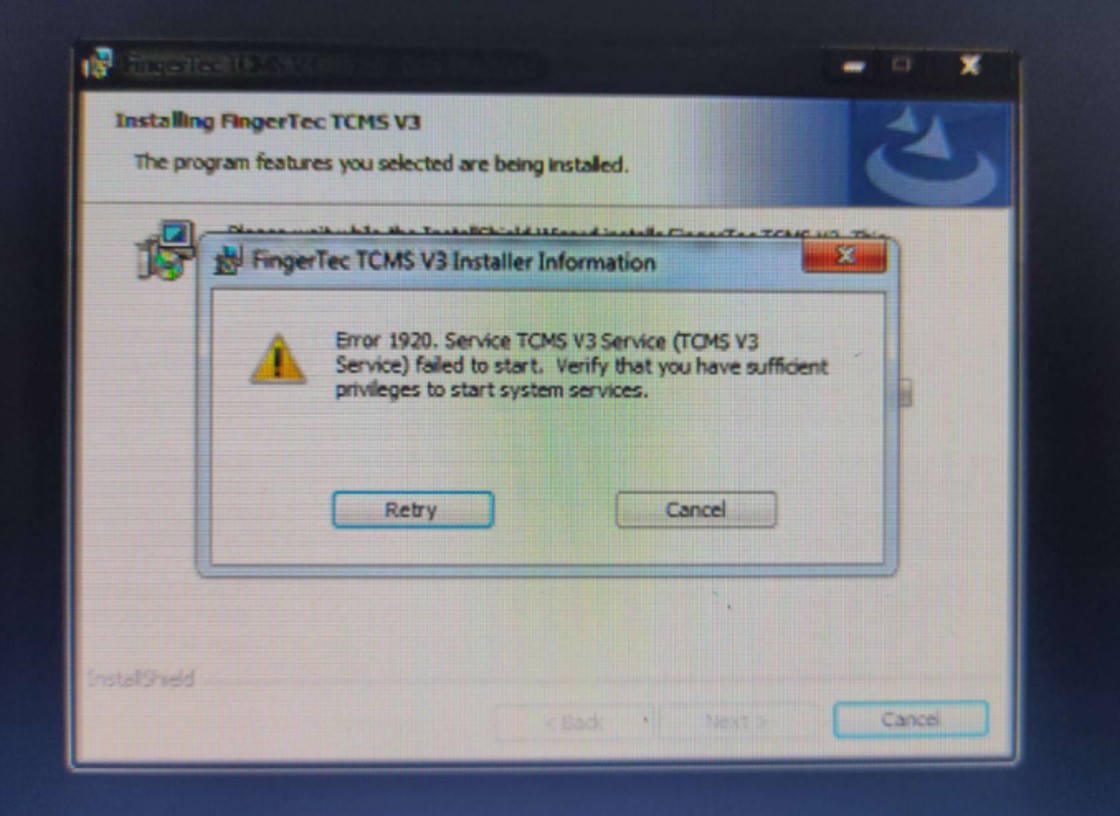
If you have already logged in as an Administrator account but couldn't install FingerTec Software successfully, please check the Windows software updates. Ensure you have updated your Windows to the latest version, and you need to restart the computer once before proceeding to perform software installation.
If the issue persists, the last solution you would try is following the steps below. And please note that this issue is related to your Windows operating system or Microsoft settings. So, if this is still unable to solve the issue, my advice is to get help from a computer or technical guy or change to another computer to install the FingerTec Software.
Process
1. Go to start, search and type:- cmd, right click on cmd .exe and select "run as administrator"

2. At the command prompt type:- net localgroup Administrators /add networkservice

3. Press enter.
4. Then type:- net localgroup Administrators /add localservice

5. Press enter.
6. Then type:- exit

7. Press enter and restart your computer
8. Proceed with FingerTec Software installation.
Note: If some of the screenshots or steps viewed here are different from the ones in the current system, this is due to our continuous effort to improve our system from time to time. Please notify us at info@ksecure.com.my or WhatsApp 019-390 6861 (Emrick), we will update it as soon as possible.
Topics