How to Fix AppMgrPx.exe Application Error (0xc000007b) in NEC SL2100 PCPro GE 5.30

Introduction
After installing NEC SL2100 PCPro GE 5.30 on a Windows 11 64-bit computer, the software failed to launch and displayed the following error:
AppMgrPx.exe - Application Error
The application was unable to start correctly (0xc000007b). Click OK to close the application.
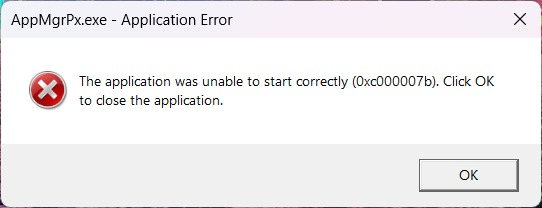
This error prevented PCPro from opening, making it impossible to configure or maintain the NEC SL2100 PBX.
Environment
| Item | Details |
|---|---|
| PBX | NEC SL2100 |
| Software | PCPro GE 5.30.00 |
| Operating System | Windows 11 Pro 64-bit |
| Error | AppMgrPx.exe (0xc000007b) |
Symptoms
After installing PCPro GE:
- Installation completed successfully.
- Double-clicking AppMgrPx.exe immediately showed the error.
- The application could not start.
Cause
In this case, the problem was caused by a missing Microsoft Visual C++ Runtime required by PCPro.
The installation package did not install the required runtime automatically.
Solution
Download and install the latest Microsoft Visual C++ Redistributable.
For my system, installing the following package resolved the issue immediately:
Latest supported Visual C++ Redistributable
x86 version
After installation:
- Restart Windows (recommended).
- Launch PCPro again.
- The software opened normally.
Why x86 Instead of x64?
Although Windows 11 is a 64-bit operating system, NEC SL2100 PCPro is a 32-bit application.
Therefore, it requires the x86 Visual C++ Runtime rather than only the x64 version.
Result
After installing the Microsoft Visual C++ Redistributable (x86):
✅ AppMgrPx.exe launched successfully.
✅ NEC PCPro opened normally.
No additional DLL files or Windows repairs were required.
Conclusion
If you encounter:
AppMgrPx.exe

The application was unable to start correctly (0xc000007b)
when launching NEC SL2100 PCPro GE, check that the required Microsoft Visual C++ Redistributable (x86) is installed before attempting more complicated troubleshooting.
In our case, installing the latest Microsoft Visual C++ Redistributable (x86) resolved the issue. However, error 0xc000007b can also be caused by other missing runtime libraries or incompatible DLL files.
Note: If some of the screenshots or steps viewed here are different from the ones in the current system, this is due to our continuous effort to improve our system from time to time. Please notify us at info@ksecure.com.my or WhatsApp 019-390 6861 (Emrick), we will update it as soon as possible.
Topics