Easily resolve OLE error when downloading data TCMS v22027 correct download process

Introduction
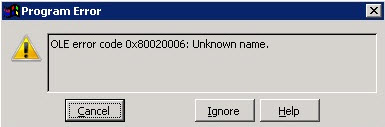
Recently, there have been multiple cases where users encountered an error while downloading data from terminals into TCMS v2.2.027. This is identified as the “OLE error” where the software is not able to read and retrieve the data due to incompatibility of the BioBridge SDK that is bundled with TCMS v2 software.
Benefits
By adhering to these tips, users will be able to clarify and solve the OLE error when downloading clocking data from FingerTec terminals.
Process
To resolve your issue, kindly follow these steps:
1) Close TCMS v2 software
2) Download the latest ft.exe file from HERE.
3) Rename the downloaded file to "ft.exe" (remove all the numbers in the file name, and
leave it as ft.exe or ft depending on your PC's setting).
4) Copy the above file, and paste it in TCMS v2 folder (Local Disk C > Program Files (x86) >
FingerTec Worldwide > TCMSv2) to replace the existing ft.exe file.
5) Download SDK Installer from this HERE.
6) Unzip the downloaded file and run the installer accordingly. Please note that there are 2
files in this folder, kindly select the one with .exe format.

7) Restart PC
8) The OLE error will not re-appear once you relaunch the TCMSv2 Software.
Note: If some of the screenshots or steps viewed here are different from the ones in the current system, this is due to our continuous effort to improve our system from time to time. Please notify us at info@ksecure.com.my or WhatsApp 019-390 6861 (Emrick), we will update it as soon as possible.
Topics